


Managing a WordPress website used to involve a lot of manual work. You had to install the platform, configure settings, pick a theme, troubleshoot errors, and figure out how to optimize performance. For beginners, this often meant spending hours learning technical details before even publishing the first post.
Today, many hosting providers include AI-powered tools that simplify the entire process.
In most cases, it refers to AI assistants built into the hosting environment that help you create content, fix issues, and optimize your website faster. For example, Hostinger includes AI tools designed to make launching and managing WordPress websites easier, even for beginners.
What does an AI Agent Actually Means for WordPress?
An AI agent in WordPress hosting is essentially a smart assistant inside your hosting dashboard or WordPress environment. Instead of doing every task manually, you can rely on AI to help with several common website tasks.
Just like you chatting with your favourite chatbot and asking it for everything. With an AI agent, you manage and update your WordPress blog.
Depending on the hosting platform, the AI tools may help with things such as:
- creating the initial structure of a website
- generating blog post drafts or outlines
- answering WordPress-related questions
- detecting website errors
- improving site performance
The goal is not to replace the website owner. Instead, AI removes many of the repetitive or technical tasks that often slow beginners down.
Getting Started With AI-Powered WordPress Hosting
Manage WordPress with your own AI agent
Launch and manage WordPress with AI
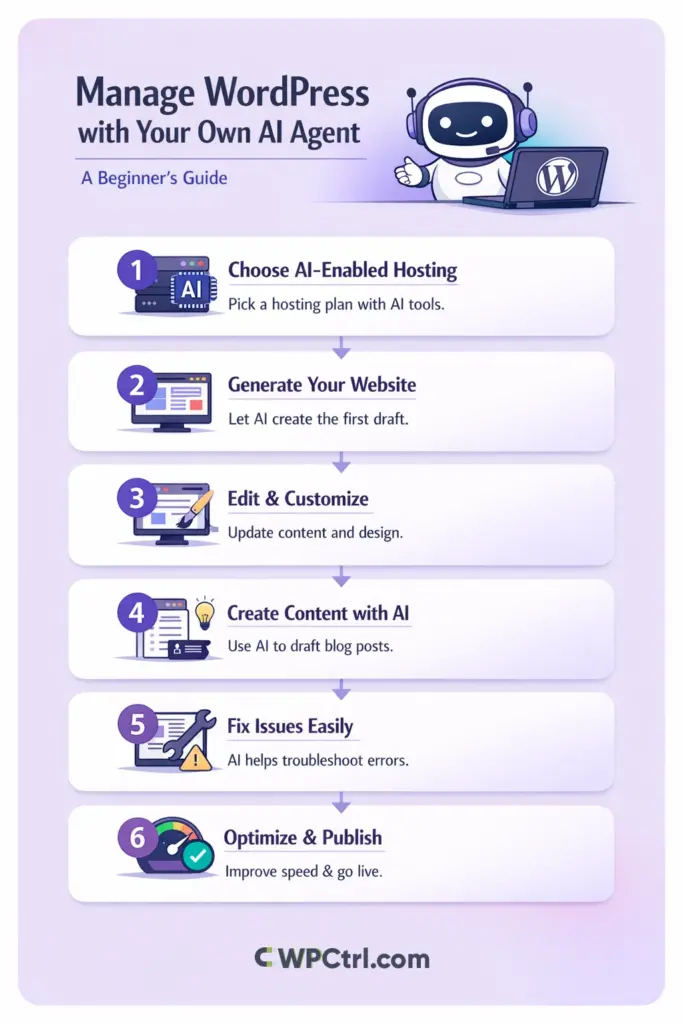
The first step is choosing a hosting plan that includes AI features. Many managed WordPress hosting providers now integrate these tools directly into their platforms.
In addition to automated WordPress installation, hosting environments may include tools like:
- AI website builders that generate a starter website
- AI content assistants that help write blog posts
- AI troubleshooting tools that detect common problems
These features are designed to make the setup process much easier for beginners who are not familiar with technical hosting tasks.
Creating the First Version of Your Website
AI website builders usually start with a simple prompt. You describe the type of website you want, the topic you plan to cover, and sometimes the style or audience you are targeting.
For example, you might enter a description like:
“Create a beginner-friendly blog about home coffee brewing with a clean layout and simple navigation.”
The AI then generates a basic website structure that usually includes:
- a homepage layout
- a blog section
- an about page
- a contact page
- placeholder text and images
This process can create a working website in minutes, which is much faster than building everything manually.
Editing and Personalizing the Website
Once the AI generates the site, you can open it in the WordPress editor and start customizing it. This step is where you transform the automatically generated template into a real website that represents your brand or blog.
Typical improvements might include updating the homepage text, replacing placeholder images, adding your own information, and adjusting the navigation menu. WordPress makes it easy to edit pages, change layouts, and install plugins if you need additional functionality.
Remember that AI-generated websites are starting points. The final quality of the website still depends on the edits and improvements you make.
Using AI to Help With Content Creation
One of the most useful AI features for beginners is the content assistant. These tools can generate article ideas, outlines, and first drafts directly inside the WordPress dashboard.
Instead of staring at a blank page, you can use AI to quickly generate a starting structure for your article. From there, you can expand the content, add your own insights, and improve the overall quality of the post.
Many bloggers use AI for tasks such as:
- brainstorming blog topics
- creating article outlines
- writing introductions
- generating FAQ sections
The key is to treat the generated content as a draft that needs editing, rather than publishing it immediately.
AI Assistance With Troubleshooting
WordPress websites sometimes experience issues caused by plugin conflicts, updates, or configuration errors. Beginners often find it difficult to identify the exact cause of these problems.
AI-powered troubleshooting tools can analyze the website and detect common issues automatically. In some cases, the system can even suggest or apply fixes.
This type of assistance can save a significant amount of time, especially for users who are still learning how WordPress works.
Improving Website Performance With AI
Website speed plays an important role in both user experience and search engine rankings. However, performance optimization usually involves technical tasks such as configuring caching or compressing images.
AI-powered optimization tools simplify this process. They analyze your website and apply recommended settings that help improve loading speed and performance.
With managed WordPress hosting, many of these optimizations happen automatically, allowing beginners to maintain a fast website without dealing with complex configuration settings.
Maintaining Your WordPress Website
Even with AI assistance, a website still requires regular maintenance. Publishing new content, updating plugins, and monitoring performance are all part of running a successful blog.
Managed hosting environments help automate many technical tasks such as security monitoring, updates, and server optimization. Hosting platforms like Hostinger combine these managed features with AI tools, making it easier for beginners to focus on content rather than technical maintenance.
Final Thoughts
The idea of managing WordPress with your own AI agent may sound futuristic, but in practice it simply means using hosting platforms that integrate AI tools into the website management process.
These tools help beginners launch websites faster, create content more easily, troubleshoot problems, and optimize performance without needing deep technical knowledge.
Instead of replacing the website owner, AI acts as a helpful assistant that simplifies many of the routine tasks involved in running a WordPress site. With the right hosting environment and a bit of creativity, beginners can now focus on what matters most: creating useful content and growing their website.
Disclosure: Some of the links on the page may contain a ref code (affiliate links), that tells the other side that we have sent you. If you liked what we suggest and you make a purchase, we may receive a commission.
